For student pilots

Know where you stand.
Show up ready.

Halfway through training, every student hits the same three questions:

  • Am I behind?
  • What's actually left?
  • What will this cost by the end?

Waypoint answers all three from your real flights, down to the §61.107 skills behind each lesson, then makes sure nothing on paper stops you on checkride day.

Free to use today. Works on your phone.
Free to use today Your costs stay private FAA §61.109 accurate
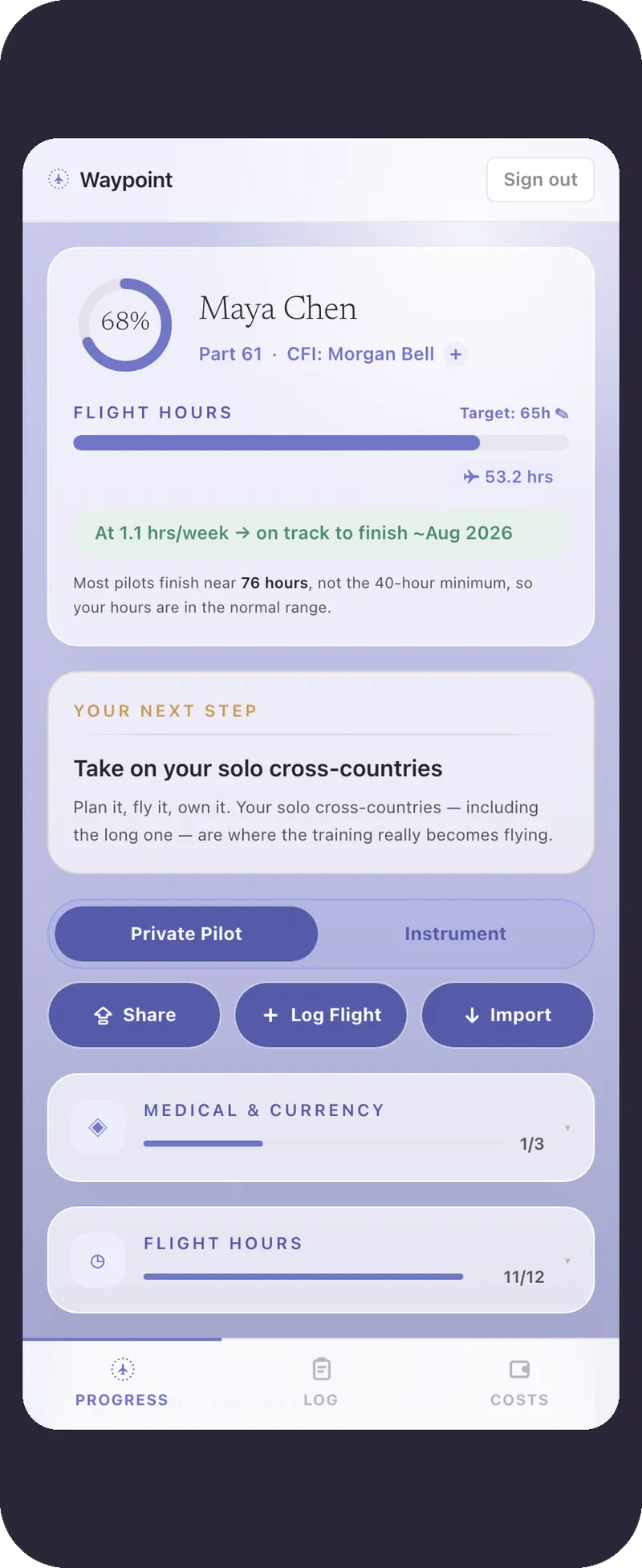
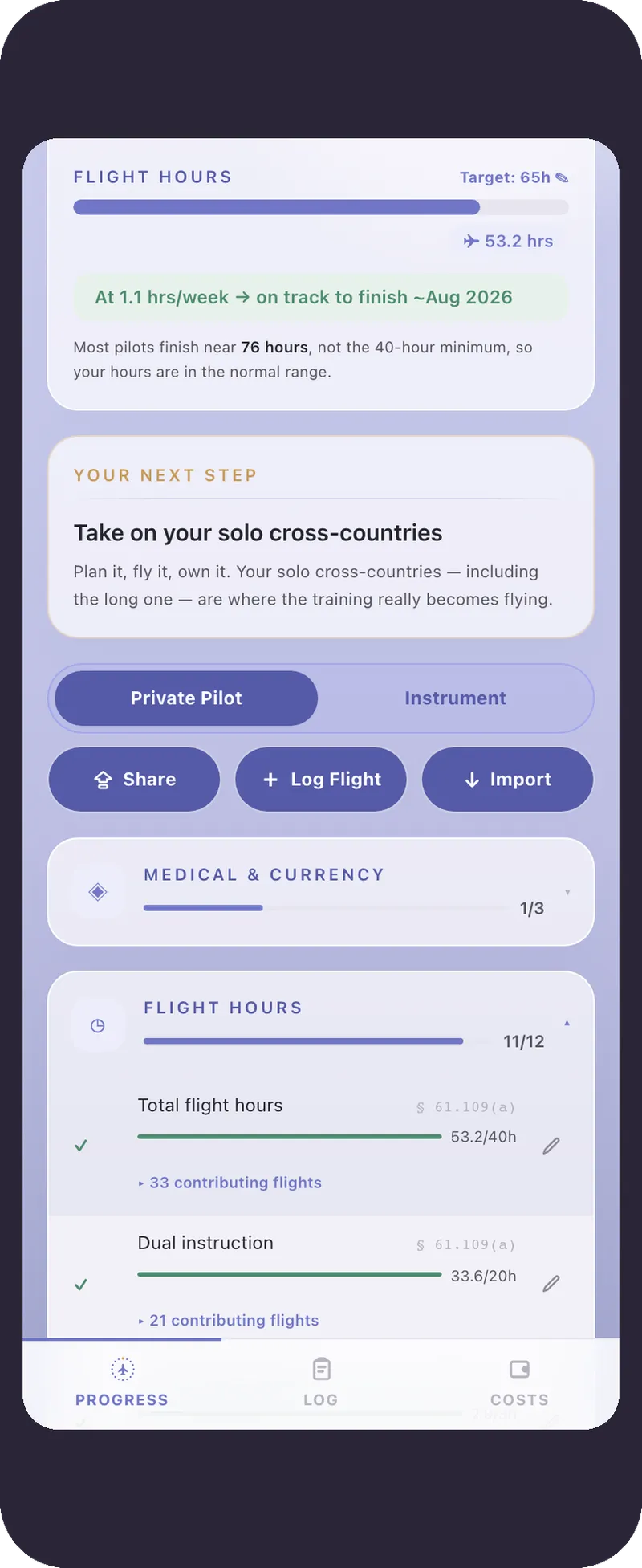
Waypoint student dashboard
The Waypoint dashboard
The hard part of learning to fly

The flying is hard. Knowing where you stand is its own problem.

A certificate is dozens of flights, a written test, a stack of endorsements, and $15–20K spread over months. Most students keep a logbook, maybe a spreadsheet, and otherwise hope they're on track.

?

“Am I on track?”

Your logbook shows hours. It doesn't tell you whether you've done the dual cross-countries or the long solo. Waypoint does that math.

$

“What am I spending?”

The bill adds up fast and quietly. Most students don't have a running total until it's a shock. Waypoint keeps a private one.

“What do I do next?”

It's easy to lose the thread between lessons. Waypoint always shows the one next thing to work on.

See your progress

Every requirement, worked out from your actual flights.

Log a flight and everything updates: the hours, the cross-countries, the night time, the solo work. You always know how close you are, without keeping a spreadsheet on the side.

It names the next step in plain language, like “take on your solo cross-countries,” instead of a wall of numbers.
You can see what's still missing for each requirement before your CFI flags it.
Bring the hours you already have by importing from ForeFlight or MyFlightbook.
Waypoint 61.109 progress
Your §61.109 progress

Log flight · Skills covered · §61.107

Suggested from this flight: cross-country, day

✓ Pilotage & dead reckoning ✓ Diversion ✓ Steep turns Short-field landing Slow flight
Still to cover Night operations Basic instrument

Tap to tag what you flew. The gaps show up right here, so you always know what's next.

Every lesson, not just checkride day

Tag what you fly. See the gaps as you go.

Hours aren't the whole story. When you log a flight, Waypoint suggests the skills you likely flew — the §61.107(b) areas of operation, mapped to the Private Pilot ACS Tasks — and shows what you haven't covered yet. No progress meter to obsess over, just the next gap to close.

  • Suggestions come from what the flight was: cross-country, night, instrument, and more.
  • Tag it in a tap; your CFI confirms it later, on the record.
  • The same tags carry into your instrument rating, useful long past the PPL.
Your spend, private to you

Know what your certificate is really costing you.

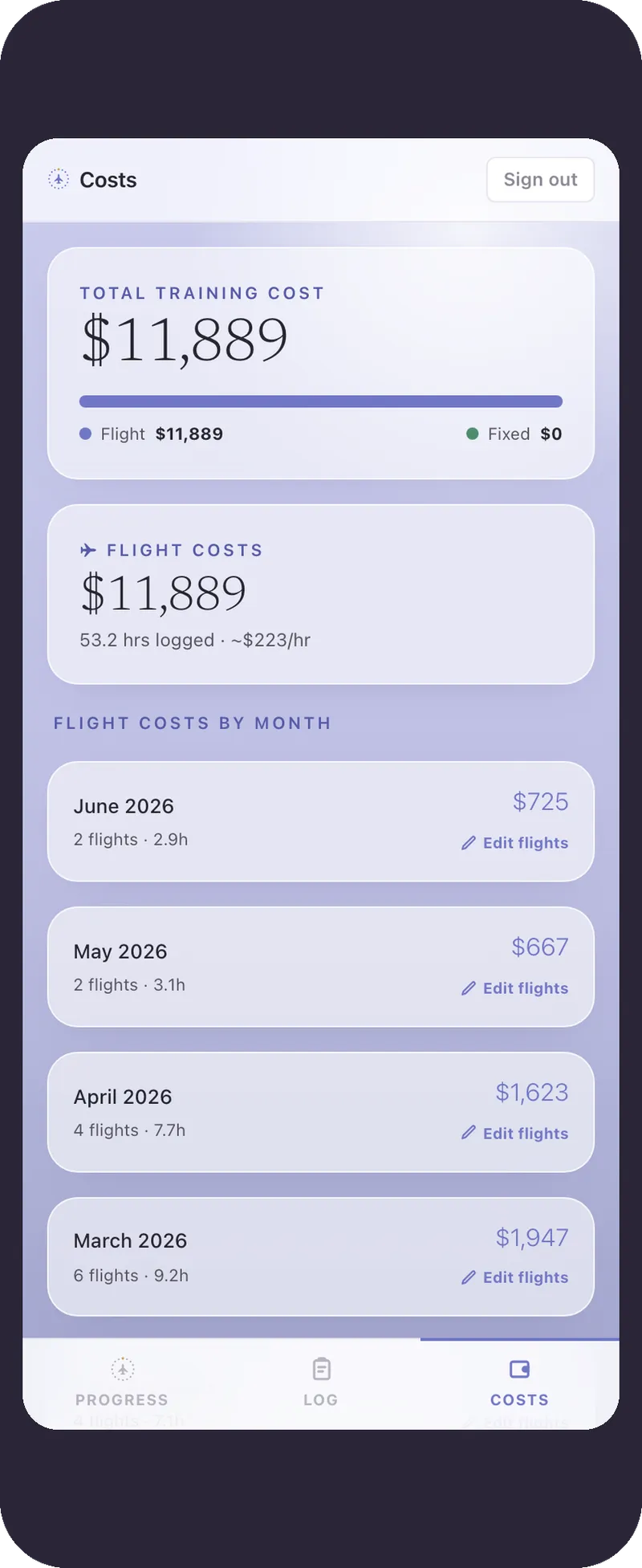
A certificate is one of the bigger things you'll buy before a car, paid for a flight at a time. Waypoint keeps a running total, split between flying and fixed costs, so the number never sneaks up on you. It is the number your logbook leaves out.

A running total of every flight and fixed cost, by month.
A flight-versus-fixed split, so you can see where the money goes.
🔒
It's private. Your spending never shows up on your CFI's view or the examiner's.
Waypoint cost ledger
Your private cost ledger
Your path

From your medical to your certificate, one step at a time.

Waypoint always points at the next real thing to do, so you're not guessing between lessons.

Get your FAA medical
Cleared to fly. The first thing in every pilot's logbook of decisions.
Fly your first solo
The big one. When the airplane is yours alone, you'll get why pilots never forget this day.
Take on your solo cross-countries
Plan it, fly it, own it, including the long one.
4
Train for night and instrument flyingYou're here
New skies, and quietly some of the best flying you'll do all year.
5
Pass your written and finish your hours
Spend a bit of time on the ground, then close the gap to the checkride.
6
Pass your checkride and you're a Private Pilot ✈
Walk in prepared. You've earned every hour.
See it in action

The whole thing in about a minute.

From logging a flight, to watching your §61.109 hours and §61.107 skills update on their own, to the costs and the read-only link you hand the examiner on checkride day.

How it works

Getting started takes a few minutes.

1

Sign up

Make an account and import any hours you already have from ForeFlight or MyFlightbook. Waypoint is an add-on to the logbook you already use, not a replacement.

2

Log your flights

After each lesson, log the flight. Your progress and costs update on their own.

3

Share with your CFI and DPE

Send a read-only link so your instructor can follow along and sign, and your examiner can review it on checkride day.

Why students

What you actually get.

Free today

Free to use today

Waypoint is free to use right now. We’re still working out pricing, and early users get plenty of notice before anything changes.

Always with you

Built for your phone

You can log a flight at the FBO and check your progress from the ramp.

Yours to keep

One record that lasts

Your hours, endorsements, and progress live in one place, and it's the record you hand the examiner at the end.

A note from the founder

I built this during my own PPL.

I'm Sami. During my own training I had a spreadsheet for requirements, another tab for what I was spending, and a paper logbook for endorsements. Waypoint is the one place I wanted instead, the thing that just told me where I stood and what came next. I hope it makes your run at the checkride a little less confusing.

Start your logbook free →
Questions

Good ones to ask.

Is Waypoint free?

It's free to use today. We're still working out how pricing will work as Waypoint grows — and we'll give early users plenty of notice before anything ever changes.

Can my CFI see how much I'm spending?

No. Your spending is private. It never shows up on your instructor's view or the examiner's.

I already have hours in another logbook. Can I bring them in?

Yes. Import the hours you already have from ForeFlight or MyFlightbook, and Waypoint keeps the record from there, so you're not re-typing it.

What does my examiner see on checkride day?

You share a read-only link. Your DPE opens it in a browser, with no account and no app, and sees an as-of-date summary of your progress and endorsements. Your costs aren't in it. It's a convenience view — you still bring your logbook, your endorsements, and your IACRA/8710 application for the examiner to verify.

Does it replace my CFI?

No. It just keeps you and your instructor looking at the same thing. They can follow your progress and sign endorsements, and they're still the ones who decide when you're ready.

Is the FAA progress accurate?

It works your §61.109 requirements out from your actual flights and has been checked carefully. It's a tracking aid, so confirm anything important with your CFI.

Start your logbook

Your checkride, one step at a time.

Free to use today. Set up in a couple of minutes and bring your existing hours with you.

Get started
Not ready to sign up? Leave your email and I'll let you know when to jump in.
Got it. I'll be in touch. Thanks for checking it out. — Sami