For independent flight instructors

Your students, checkride-clean.

Right now your students live in your head, a spreadsheet, and a stack of paper, and one missed signoff can cost one of them a checkride slot. Waypoint puts the whole roster on one screen: who's flying, who's stalled, whose endorsements expire soon, and who'd pass a paperwork audit today. Free for instructors.

Free for instructors. No credit card to start.
Built by a private pilot FAA §61.109 accurate Works on your phone
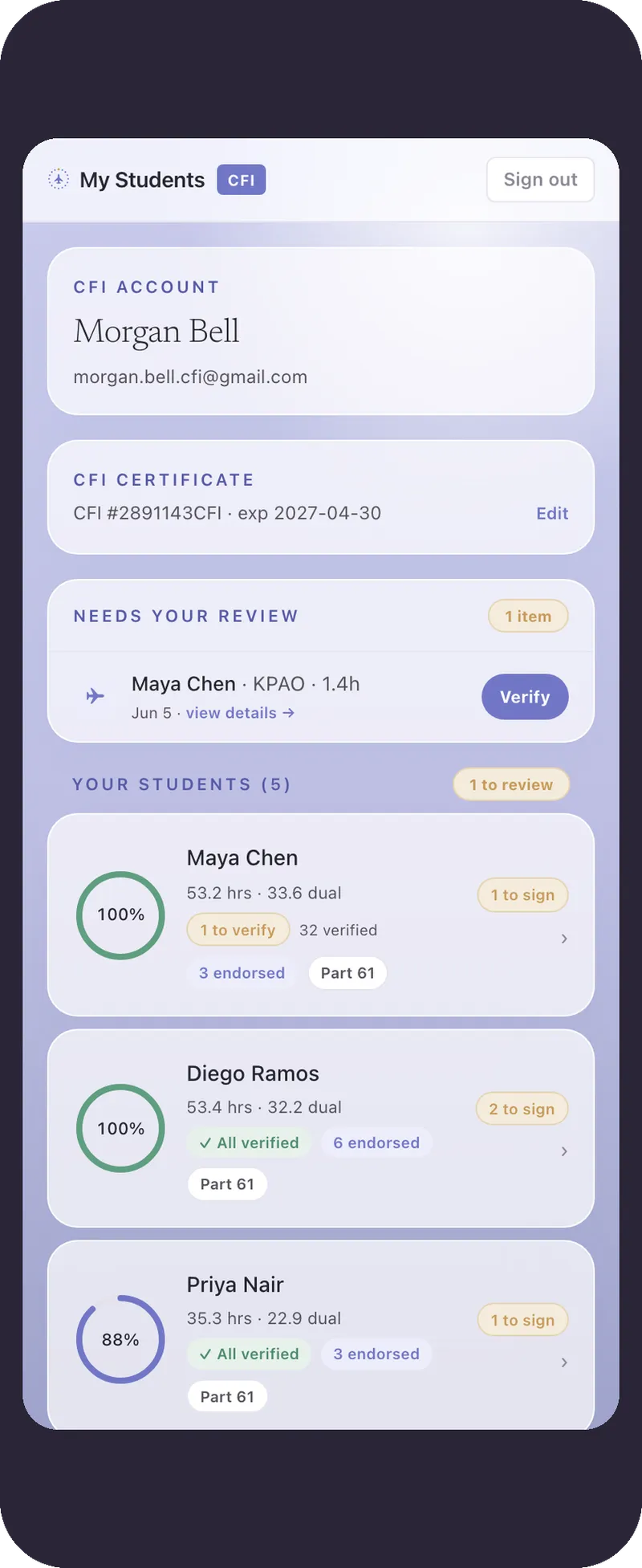
Waypoint CFI roster of students
The Waypoint dashboard
The problem

Tracking a student to the checkride is held together with duct tape.

You teach. Meanwhile the record of where each student stands is scattered across four places, none of them built for an instructor with more than one student.

An EFB logbookGreat for hours. Says nothing about what's left for the checkride.
A spreadsheetThe §61.109 requirements, tracked by hand and rebuilt by every student.
A paper logbookKept around just for the endorsement signatures.
Your memoryThe mental math for every student, carried around in your head.
There's no tool built for the independent CFI. School software won't sell to one instructor, and logbooks have no roster view. Waypoint does.
What it does

What it does for you and your students.

1

Every student, one screen

See each student's progress at a glance, with a flag on whoever needs an endorsement signed, so a missed signoff never costs someone a checkride slot.

2

§61.109, across your whole roster

Each student's own logbook already shows them the hours they have left. Waypoint rolls every student up against the real §61.109 requirements for you, and flags the next step, so you are not re-checking it one logbook at a time.

3

Endorsements and a link for the DPE

Sign endorsements in the app. On checkride day your student sends the examiner a link that opens in any browser, no account needed.

Inside one student

Then open any one of them.

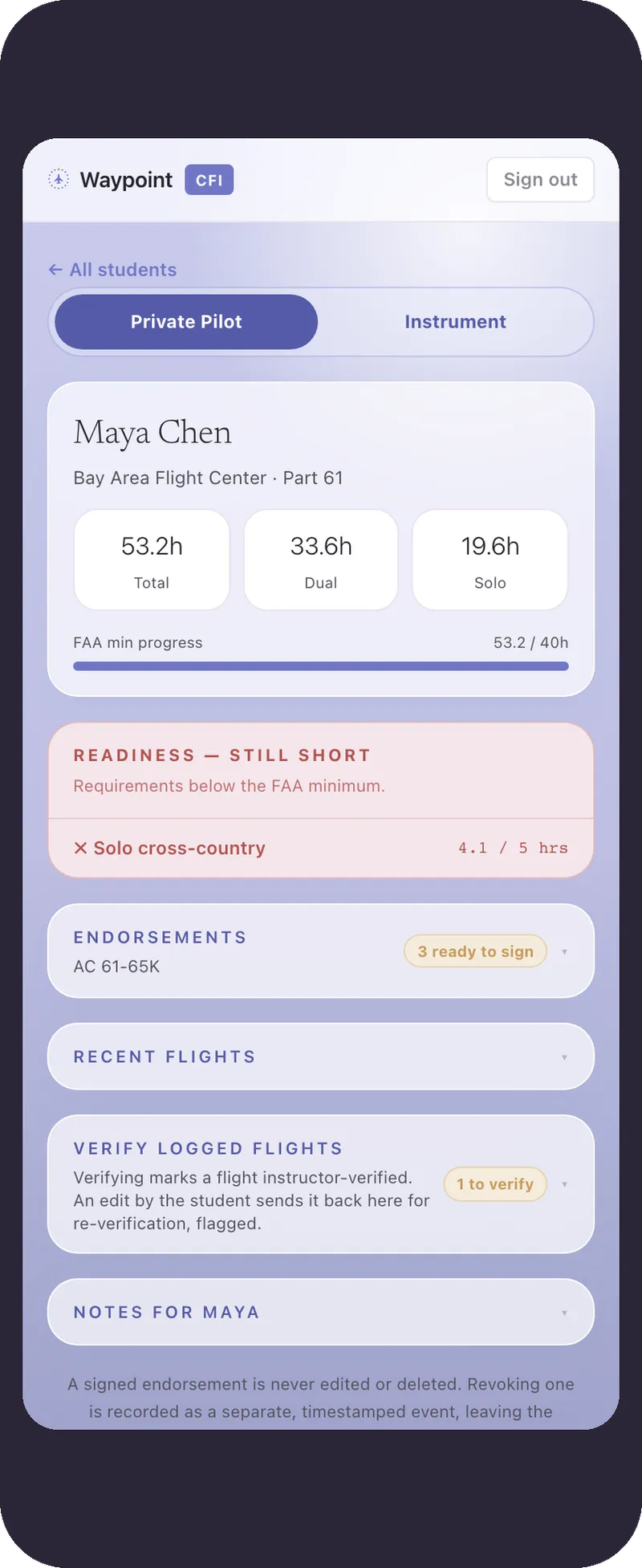
Tap a student and you are in their full picture: every requirement worked out from their flights, every endorsement, and the read-only link they hand the examiner.

Their §61.109 requirements, worked out flight by flight, with the next step flagged.
Endorsements you sign in the app, with the AC 61-65 wording and your certificate on file.
The read-only record the student hands the examiner on checkride day.
Open the app →
Waypoint endorsement screen with AC 61-65 wording
One student's progress

One tap, on the record

Verify the flight and its skills together.

Your student tags what they flew. After the lesson you confirm it in one pass. The hours and the §61.107 skills are verified in a single action, tied to the flights that back them. Your signature is accountable, not a leap of faith.

  • A queue of what's waiting, not a spreadsheet to rebuild from memory.
  • Confirm all, edit a tag, or reject with a note. Built to take seconds.
  • Only verified work feeds the §61.107 log and the DPE doc pack.
Maya Chen · §61.107 coverage10/12 areas

Today's lesson · to verify

Cross-country dual§61.107 · VII Navigation · 1.4 hTo verify
Pilotage & dead reckoning§61.107 · VII NavigationTo verify
Diversion & lost procedures§61.107 · X Emergency opsTo verify
Steep turns§61.107 · V Performance✓ Verified
Confirm all · sign record

One review verifies the flight + its skills.

How it works

You can be set up in a few minutes.

1

Add a student

Invite a student and pull in the hours they already have from ForeFlight or MyFlightbook. Waypoint is an add-on to the logbook they already use, not a replacement.

2

They log, you see

When they log a flight, their progress updates on its own. You know where they are without asking.

3

Sign and send

Sign endorsements when they're earned. At the end, your student walks into the checkride with the whole record in one link.

Why instructors

Built for the freelance CFI first.

The features that matter most to a freelance instructor, not a fleet.

Built for one person

A roster of your own

Rosters mostly live in school software you can't buy as one person, or in a folder of paper. Waypoint gives you one made for a freelance instructor.

Fewer surprises

No busted checkrides on a technicality

Roughly 1 in 5 applicants gets turned away over paperwork. You see exactly what each student still needs, and what expires when, before anyone books an examiner.

It holds up

Endorsements that survive an export

A record that doesn't fall apart when it's exported. The thing that finally lets a student put the paper logbook away.

A note from the founder

I built the tool I wished I'd had as a student.

I'm Sami. I got my private certificate the slow, expensive way, tracking my own progress in a spreadsheet while my instructor signed endorsements in a paper book. Waypoint is the thing I wanted back then. I'm setting up the first handful of instructors myself right now, and I'd like to hear whether it's actually useful to you.

Try the live app →
Questions

The things CFIs ask first.

Is it really free?

Yes. Waypoint is free for flight instructors, and your students stay free through their private certificate. No credit card to start.

Are digital endorsements actually legal?

Yes. 14 CFR §61.51 permits electronic logbook entries and endorsements, and AC 120-78 treats an electronic signature the same as a handwritten one. No FAA approval is required. Waypoint uses the current AC 61-65 endorsement wording.

Can I bring in a student who already has hours?

Yes. Import the hours they already have from ForeFlight or MyFlightbook, and Waypoint keeps the record from there. They won't re-type a half-finished logbook.

Does it cost my students anything?

No. Students use Waypoint free through their private certificate. And what they're spending on training is never visible to you or the examiner.

What does the examiner see?

Your student shares a read-only link. The DPE opens it in a browser, with no account and no app, and sees an as-of-date record of progress and endorsements.

Is Waypoint deciding eligibility for me?

No. It surfaces what the regulations require so you can stay organized. You and the examiner are still the ones who decide whether a student is ready.
Get started

Try it with one of your students.

Leave your email and I'll help you get set up with one of your current students myself.

Create your account
Not ready to make an account? Leave your email and I'll check in.
Got it. I'll reach out. Thanks for taking a look. — Sami